If you have been looking at used Tesla V100 cards recently, you have probably seen two very different opinions:
- one side says the card is still strong and offers great value
- the other says the market is full of traps and DIY users can easily get burned
Both are true.
The point is not that V100 is unbuyable. The point is that you cannot buy it the same way you would buy a normal consumer GPU. What matters is not only whether it boots, and not only whether the seller says “like new” or “pulled from an original server”. What matters is whether the card has been tampered with, what its ECC condition looks like, and whether the cooling and power setup are actually reliable.
This article pulls together the most useful checks for buying and using one in practice.
Quick Takeaways
If you only want the short version, remember these points:
V100was produced roughly from2017to2021, and2021cards are uncommon in the16Gversion- looking only at “zero ECC” or “original pull” is not enough, because both data and physical condition can be altered
- the biggest risk is often not buying an old card, but buying one that was disassembled, reflashed, or paired with a bad cooling setup
- for
DIYusers, the real problem is usually not the core itself, but the adapter board, power delivery, hotspot temperature, and backplate cooling
1. Start with Production Date and Batch Clues
A very practical method is to check the chip date first, then see whether the dates on nearby components match it.
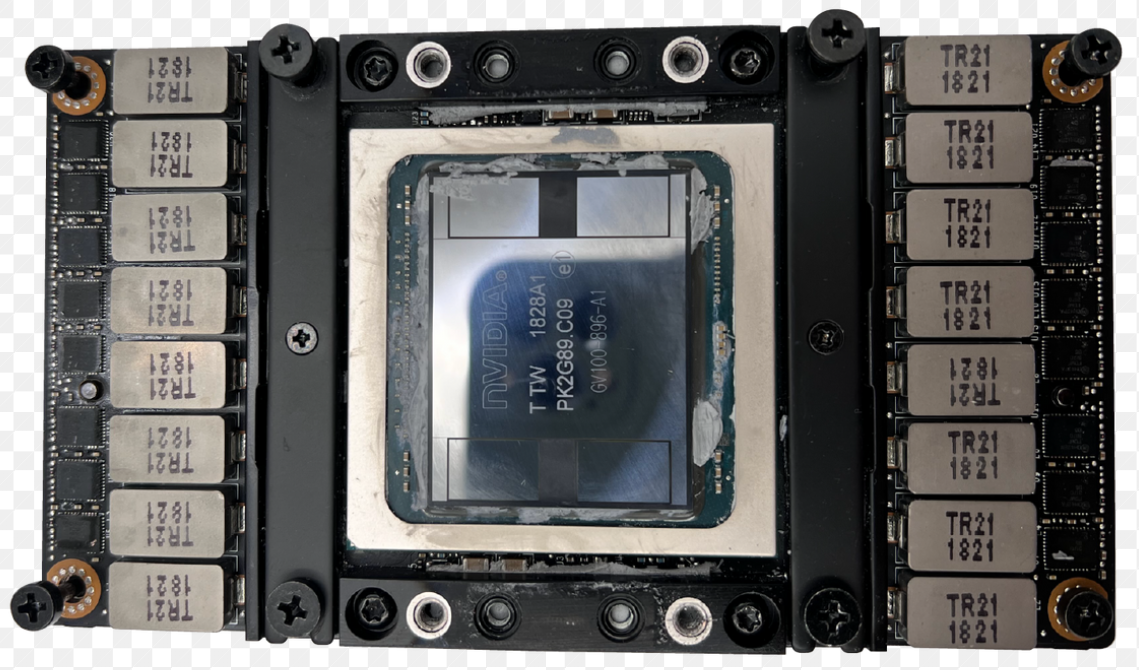
For example, if the chip surface shows 1828, it usually means:
18= year201828= week28
So that chip was produced in week 28 of 2018.
Besides the chip package, nearby inductors often carry date-related markings too. If the chip date and inductor date are far apart, for example:
- chip date is
2017 - inductors point to
2020
then you should be cautious. It does not automatically prove the card is bad, but it does suggest it is no longer in a very original state.
On the other hand, if the dates broadly line up, such as:
- a
2018chip with2018surrounding components - a late
2019chip paired with2020components
that is much more normal.
2. Do Not Only Look at the Chip: Check Inductors, Springs, and Frame
Visual inspection is best broken into a few separate checks.
1. Touch the inductors first
Gently press or touch the inductors. Under normal conditions, none of them should feel loose.
If one of them is already moving, it usually means:
- the solder condition is not healthy
- the problem may worsen with continued use
Even if the card still works now, that is not a good sign.
2. Check whether the retaining spring has been removed before
There is a useful logic here:
- if the seller insists this is an “original server pull”
- then the retaining spring generally should not have been casually removed
In a normal factory server environment, people do not usually remove this spring for no reason.
If the spring comes off very easily, the card was probably opened before. If the seller is also claiming it is untouched, that claim deserves skepticism.
3. If the frame comes apart too easily, that is also suspicious
Once the middle frame is removed, if the whole structure separates with almost no effort, that usually means the card has already been disassembled multiple times.
That matters on used V100 cards because reflashing, modification, and repair work often leave exactly these kinds of traces.
3. If the Backplate Separates Too Easily, Suspect a Reflash or Prior Tampering
One especially important detail is that there is a metal plate under the PCB. It is not only for protection; it also helps with heat dissipation.
In a normal original condition, this backplate is usually not easy to remove. Reasons include:
- adhesive
- a tight structural fit
- the design was not meant for repeated disassembly
If the backplate separates from the PCB with only a little force, then you should suspect:
- it has been opened before
- the card may have had its
VBIOSreflashed - there may have been secondary modifications
That does not automatically make it unusable, but it is clearly inconsistent with “original and untouched.”
4. How to Read ECC: What Matters Most Is Not Whether It Is Zero, but Whether It Grows
ECC is one of the first things people look at on a V100, and it really needs to be interpreted carefully.
A common method is to use nvidia-smi in detailed mode and check the ECC Errors section.
1. Real-time errors are the most dangerous
The upper section can be understood as real-time errors.
If those numbers keep increasing while the card is running, that usually means the card is already in an unstable state.
In simple terms:
- a card that runs without new errors matters more than a static zero reading
- a card that starts increasing errors under stress is much more worrying than one with only historical accumulated counts
2. Lifetime accumulated errors are not always scary
Another section shows lifetime accumulated errors, meaning how many corrected or uncorrected events happened across the card’s life.
If those values are only:
- single digits
- or maybe in the teens
that is not automatically a disaster.
If real-time errors do not continue increasing during actual use, the card may still be perfectly usable.
3. The page retirement section deserves more attention
The page retirement section is even more important, because it indicates memory blocks that were retired after uncorrectable errors.
A practical way to think about it is:
- single-bit and double-bit categories may each have retired blocks
- if the total climbs past
10, you are entering a range where caution is warranted
That does not always mean the card is unusable, but it does suggest reduced effective memory and weaker long-term confidence.
5. Do Not Worship “Zero ECC”: The Data Itself Can Be Manipulated
There is a very practical warning here:
ECC numbers are not inherently sacred.
If a card has:
- extremely clean-looking data
- but obvious signs of disassembly
- and a structure that clearly looks worked on
then you should not trust “zero ECC” by itself.
A useful analogy is an old car that suddenly shows 0 mileage and almost no tire wear after many years. It is hard not to suspect the odometer was touched.
The same idea applies to V100:
- numbers that look too perfect are not always good news
- what matters is whether the data, the physical condition, and the stress-test behavior all make sense together
6. Stress Testing Is Necessary, but Testing Only the Core Is Not Enough
You can use a tool such as gpu-burn to stress the card for several minutes or longer and watch:
- whether it remains stable
- whether the card drops out
- whether new
ECCerrors appear
But there is another important point:
Testing only the core does not prove the entire card is healthy.
A lot of V100 failures do not start with the core. They start with:
- overheating in the power-delivery area
- insufficient cooling around the backplate
- excessive hotspot temperatures
- adapter boards and cooling systems that are always operating too close to the edge
So stress testing only proves that “the card can run right now.” It does not prove that “this DIY setup will survive in the long run.”
7. For DIY Users, the Real Failure Point Is Usually Cooling and Power, Not the Purchase Itself
This is probably the most important part of the entire topic.
The core idea is simple:
For DIY users, casually combining an adapter base with a generic cooler is not a robust plan.
That is because V100 is not a normal consumer card. It is a server accelerator with:
- high power draw
- high heat density
- complicated heat distribution
The chip is not the only thing producing heat. The backplate, power area, and connector region also get hot, and sometimes very hot.
1. Do not only watch average GPU temperature
Many monitoring tools show the average card temperature, but the more dangerous number is often the hot spot.
That means:
- the visible temperature may only be in the 60s Celsius
- while local hotspots may already be over 100C
That is why some DIY V100 builds look “fine” on paper and then suddenly die later.
2. Backplate cooling must be considered
Cooling for the backplate and power area cannot be ignored.
If you only cool the core, but:
- the
MOSarea is neglected - the backplate gets no heat transfer help
- the rear side lacks proper thermal design
then the full setup is still incomplete.
3. Cheap improvised water-cooling setups are risky
You should be cautious about the “random adapter board + cheap AIO water cooler” style setup.
The issue is not that it always fails immediately. The issue is that it often has:
- uneven water-channel coverage
- incomplete cooling for the power-delivery area
- poor control of the actual hotspot zones
- unpredictable long-term lifespan
8. If You Still Want to DIY, At Least Watch These Points
The most practical recommendations are:
- prefer more mature adapter-board solutions with a better track record
- do not focus only on the core; the rear power area and backplate need thermal attention too
- the water block needs real coverage and even heat handling, not just physical contact
- after stress testing, keep watching temperatures, hotspots, and long-term behavior
- PSU quality also affects coil whine and overall stability
In other words, the hard part of a DIY V100 build is not “getting it to boot.” The hard part is “keeping it alive and stable afterward.”
9. Coil Whine and Adapter-Board Variance Are Real Problems Too
Two more points are often overlooked.
1. Coil whine may not be fully eliminable
It depends on the individual card, the inductors, capacitors, and the power environment. It is not something you can always solve with one cable or one small accessory.
2. Adapter-board variance is huge
That is why some sellers, even when they are willing to sell a bare card, still emphasize:
- bench-testing it first
- recording the serial number
- doing stress tests
- documenting the process
Because a lot of disputes are not caused by the silicon itself. They are caused by the adapter board and cooling solution paired with it afterward.
Closing
So, is Tesla V100 still worth buying? Yes, but only if you understand what you are buying and how you plan to use it afterward.
If you only check:
- whether it powers on
- whether
ECCis all zero - whether the seller says “original pull”
that is nowhere near enough.
The more useful things to verify are:
- whether the dates and batch clues line up
- whether there are suspicious signs of prior disassembly
- whether the backplate and structure were clearly opened before
- whether errors increase under stress testing
- whether your cooling and power setup are actually trustworthy
Especially for DIY users, the most dangerous part of V100 is often not “buying an old card”, but underestimating how demanding these cards are about cooling, power delivery, and modification quality.