Prerequisite: Hardware Must Support Hot Swap
First confirm your drive backplane/controller and platform support hot swap. This is the basic requirement.
BIOS Settings You Need
Using ASUS as an example:
- Press
F2orDELduring boot to enter BIOS. - Switch to
Advanced Mode. - Go to
Advanced -> PCH Storage Configuration, find the target SATA port, and setHot PlugtoEnabled. - Press
F10to save and exit.
After this, hot-swap should be available. Other motherboard brands provide similar options.
Operating-System Steps
Windows
- Stop I/O activity on the target drive.
- In Device Manager, find the drive and choose to uninstall/eject the device.
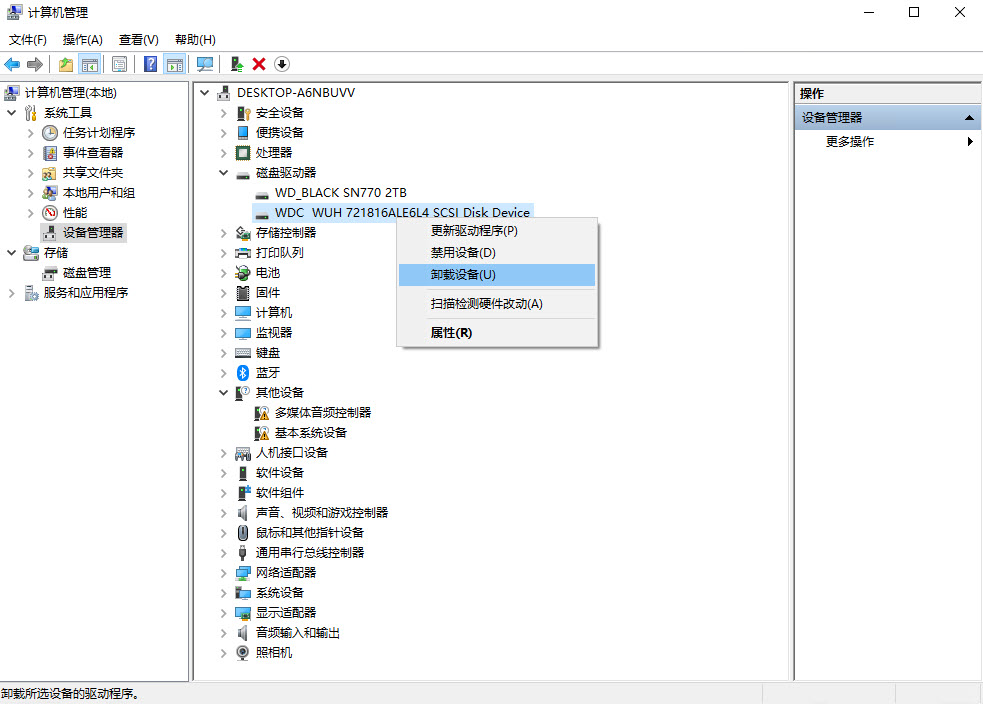
- After successful removal, physically unplug the drive.
Linux
- Stop I/O activity on the target drive.
- Unmount the file system (for example
umount /dev/sda). - If using LVM, deactivate the volume group (for example
vgchange -an). - Put the disk into standby (for example
sudo hdparm -Y /dev/sda). - Remove the device from the OS (
echo 1 | sudo tee /sys/block/sda/device/delete). After this command, verify the disk has fully stopped spinning before unplugging power/data. Pulling a still-spinning HDD can damage the head/platter assembly. - Once the above steps are completed, unplug the drive.