Using Agent Skills to Replace Copilot's 'Generate Commit Message' in VS Code

Use the local `git-commit-push-zh` skill to replace VS Code's commit message generation and keep a standardized commit/push workflow.

GitHub Copilot’s “Generate Commit Message” in VS Code is very useful. Once the quota is exhausted, the reset cycle can feel long. This post is a practical attempt to replace that feature with local Agent Skills.
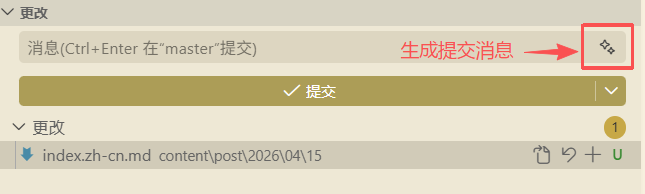
Generate commit message

Problem and Goal

The goal of this post is to provide a practical alternative: use git-commit-push-zh skill agents to complete standardized commits and pushes.

Alternative: git-commit-push-zh

This skill turns your current changes into a fixed workflow:

  1. Check change status.
  2. Confirm the current branch.
  3. Stage changes.
  4. Generate a Chinese commit message.
  5. Run commit.
  6. Push to the remote branch.

The corresponding commands are:

1
2
3
4
5
git status --short
git branch --show-current
git add -A
git commit -m "<中文提交信息>"
git push origin <当前分支>

Suggested Commit Message Convention

Use this format consistently:

1
<类型>(<范围>): <中文摘要>

Type examples:

  • feat: New feature
  • fix: Bug fix
  • docs: Documentation update
  • refactor: Refactoring
  • chore: Maintenance changes

Examples:

  • feat(site): 新增全站 head 广告脚本注入
  • fix(i18n): 修正 relref 相关文章链接路径
  • chore(content): 合并 AI 工作流分类到 AI工具

Common Failure Scenarios

  • nothing to commit: no new changes to commit; stop before pushing.
  • push failed: check permissions, remote branch state, and conflicts first.
  • SSH/permission issues: verify credentials and access, then retry.

Appendix: Original SKILL.md

The content below is the original git-commit-push-zh document, preserved as-is for reuse and maintenance.

 1
 2
 3
 4
 5
 6
 7
 8
 9
10
11
12
13
14
15
16
17
18
19
20
21
22
23
24
25
26
27
28
29
30
31
32
33
34
35
36
37
38
39
40
41
42
---
name: git-commit-push-zh
description: 在当前 Git 仓库中将“当前更改”完成一次标准提交流程:检查状态、暂存变更、生成中文提交信息、执行 commit 并 push 到当前分支对应远端。用户提出“提交代码”“提交当前更改”“生成中文提交信息并推送”“git commit push 中文说明”等请求时使用。
---

# 中文提交并推送

使用此技能将当前仓库改动一次性提交并推送到远端。

## 工作流程

1. 查看变更状态:`git status --short`2. 确认当前分支:`git branch --show-current`3. 暂存当前变更:`git add -A`4. 生成中文提交信息(简洁、可检索)。
5. 执行提交:`git commit -m "<中文提交信息>"`6. 执行推送:`git push origin <当前分支>`
## 提交信息规范(中文)

1. 建议格式:`<类型>(<范围>): <中文摘要>`2. 类型示例:`feat``fix``chore``docs``refactor`3. 摘要要求:准确描述本次改动,不写空话。
4. 若仅少量变更,也保持可读性与可检索性。

示例:

- `feat(site): 新增全站 head 广告脚本注入`
- `fix(i18n): 修正 relref 相关文章链接路径`
- `chore(content): 合并 AI 工作流分类到 AI工具`

## 错误处理

1. 若无可提交变更(nothing to commit),明确告知并停止 push。
2. 若 push 失败,先回报关键错误(权限、远端不存在、冲突等)。
3. 常见 SSH/权限问题可在用户确认后重试高权限环境。

## 输出约定

1. 汇报提交哈希、分支名、提交信息。
2. 汇报 push 结果(成功或失败原因)。
3. 仅在确有失败时提供下一步最小操作建议。
记录并分享
Built with Hugo
Theme Stack designed by Jimmy